Terminal built
for AI coding
The only terminal where Claude Code, Starship, Delta, and syntax highlighting work out of the box. No config files. No plugin managers. Just open and build.
$ brew tap szj2ys/arb && brew install arb


Everything you need.
Nothing you don't.
arb ships with a carefully curated set of tools so you can start working the moment you open it. No plugins to install. No config files to write.
Zero Config
Polished defaults with JetBrains Mono, Arb Dark theme, optimized macOS font rendering, and smooth animations. Open it and start working.
Built-in Shell Suite
Comes pre-loaded with Starship prompt, z smart directories, Delta for diffs, syntax highlighting, autosuggestions, and completions.
GPU Accelerated
40% smaller binary, instant startup, lazy loading, and a stripped-down GPU-accelerated rendering core. Fast and lightweight.
Lua Scripting
Full Lua scripting support for infinite customization. Configure every detail at ~/.config/arb/arb.lua
See it in action
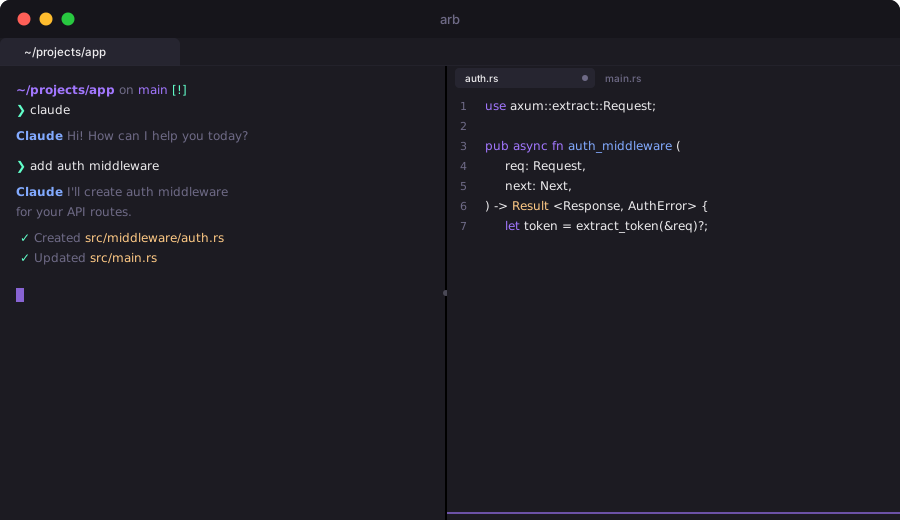
Native Split Panes
Work on multiple tasks simultaneously. Drag to resize, keyboard shortcuts to navigate. No tmux required.
Split Horizontally
Cmd+Shift+Enter
Split Vertically
Cmd+Shift+D
Drag to Resize
Mouse drag
Navigate
Cmd+Opt+Arrow
Your AI workflow, supercharged
arb is purpose-built for developers who use Claude Code, GitHub Copilot, and AI coding tools every day. Here is how it fits your workflow.
Open arb, start coding
Launch arb and your shell is ready with Starship prompt, syntax highlighting, and autosuggestions. No setup required — brew install and go.
Run Claude Code inline
Type claude "refactor auth module" and watch AI edit your files in real time. Built-in Delta renders beautiful diffs instantly.
Review diffs with Delta
Every git diff is syntax-highlighted with line numbers, side-by-side view, and color-coded additions and deletions. No config needed.
Ship fast, stay private
Commit, push, and move on. No account needed, no telemetry, no data leaves your machine. MIT-licensed and fully open source.


$ brew tap szj2ys/arb && brew install arb
Ready in 3 steps
Install
Run brew tap szj2ys/arb && brew install arb. One command, no dependencies. Apple-notarized — opens without security warnings.
Open
Launch arb. Starship prompt, syntax highlighting, autosuggestions, and Delta diffs are already configured. Nothing to install or tweak.
Code
Start building. Use Claude Code, review diffs, navigate with z, split panes — everything works out of the box.
How arb compares
| Feature | arb | iTerm2 | Alacritty | Kitty | Ghostty | Warp |
|---|---|---|---|---|---|---|
| Zero Config | ✓ | — | — | — | — | Partial |
| Built-in Tools | ✓ | — | — | — | — | — |
| GPU Rendering | ✓ | Partial | ✓ | ✓ | ✓ | ✓ |
| Lua Scripting | ✓ | — | — | ✓ | — | — |
| No Login Required | ✓ | ✓ | ✓ | ✓ | ✓ | — |
| Open Source | ✓ | ✓ | ✓ | ✓ | ✓ | — |
| Binary Size | ~40 MB | ~55 MB | ~15 MB | ~30 MB | ~15 MB | ~90 MB |
| Shell Bootstrap | ~100 ms | ~250 ms | ~120 ms | ~130 ms | ~110 ms | ~200 ms |
| Built-in Tools Count | 6 | 0 | 0 | 0 | 0 | 3 |
$ brew tap szj2ys/arb && brew install arb
Everything pre-installed
Starship
Minimal, fast, and infinitely customizable cross-shell prompt.
z
Smart directory jumping. Navigate to any folder by typing partial names.
Delta
Beautiful syntax-highlighted diffs with line numbers and side-by-side view.
Syntax Highlighting
Real-time command syntax coloring for instant visual feedback.
Autosuggestions
Fish-like suggestions based on your history. Accept with right arrow.
Completions
Tab completions for commands, paths, and arguments out of the box.
Frequently asked questions
arb ships with a complete shell suite (Starship, z, Delta, syntax highlighting, autosuggestions) pre-configured. iTerm2 requires you to install and configure each tool separately. arb also has GPU-accelerated rendering and a smaller binary (~40 MB vs ~55 MB).
Yes. arb supports Claude Code, GitHub Copilot, Aider, and other AI coding tools. Fast shell boot (~100ms), built-in Delta for reviewing AI-generated diffs, and native split-pane support make it ideal for AI-assisted development.
Yes. arb is MIT-licensed and fully open source. No login required, no account needed, no telemetry. The source code is on GitHub.
A single Lua config file at ~/.config/arb/arb.lua controls fonts, colors, key bindings, and behavior. Defaults are tuned for most developers, so customization is optional.
Yes. arb uses the same Lua configuration format as WezTerm. Most configs work with minimal changes. arb adds built-in shell tools, a smaller binary, and opinionated defaults.
Ready to start?
Install arb in seconds. Apple-notarized, no security warnings.
Resources
Guides to help you get the most out of AI-powered terminal workflows.
Best Terminal for Claude Code in 2026
Why your terminal choice matters for AI coding, and how arb delivers GPU acceleration, built-in tools, and instant productivity.
Read the guide →Best Terminal for Cursor IDE in 2026
How to pair Cursor IDE with a dedicated GPU-accelerated terminal for faster test runs, diff reviews, and AI agent sessions.
Read the guide →Best Terminal for Aider in 2026
Aider streams tokens and auto-commits to git. Learn why GPU rendering and built-in Delta make arb the ideal Aider terminal.
Read the guide →arb: The Best WezTerm Alternative
Same Lua scripting, same GPU rendering, half the binary size. Migration guide and feature comparison included.
Read the guide →AI Coding Terminal Setup Guide
Step-by-step setup for Claude Code, Copilot CLI, and AI-assisted workflows. From install to productive in under a minute.
Read the guide →Best macOS Terminal Emulators in 2026
Complete comparison of arb, iTerm2, Alacritty, Kitty, Ghostty, Warp, and Terminal.app. Features, performance, and AI coding support.
Read the comparison →arb vs Ghostty: GPU Terminal Comparison
Honest comparison of two GPU-accelerated terminals. Built-in tools vs minimal design. When to choose each one.
Read the comparison →Best Terminal for Windsurf IDE
Why arb is the perfect companion terminal for Windsurf. GPU rendering, built-in diff, and seamless Cascade workflow.
Read the guide →